How to Fix Drop Calls The Complete Guide to Stronger, More Reliable Mobile Signal
Drop calls, Every day we rely on our smartphones for banking, payments, social media, business communication, navigation, and entertainment. Because of this, knowing how to fix drop calls has become a modern necessity.
Most of us don’t even realise how many digital tasks we perform on our phones until one moment changes everything: the signal disappears. Suddenly, you can’t log in to your banking app, your videos won’t upload, and your phone call cuts out in the middle of an important conversation. It’s only then that we truly appreciate the value of strong, stable mobile connectivity.
For people on holiday trying to upload HD photos, business users making client calls, or families staying in touch, drop calls and slow data can ruin the moment. If your calls frequently disconnect or your audio breaks up repeatedly, this guide will show you how to fix drop calls quickly and effectively.
Why Do Calls Drop? Understanding the Root Causes
Before exploring how to fix drop calls, it’s important to understand why they happen. In most cases, just a handful of issues are responsible and luckily, all of them have solutions.
The top causes of dropped calls include:
- Distance from the nearest mobile tower
- Structural barriers blocking signal
- Interference from terrain or environmental obstacles
- Weak indoor coverage
- Mobile phone hardware or software issues
By identifying which one affects you, you can take targeted steps to improve your signal instantly.
Remote Location: Too Far From the Nearest Mobile Tower
Imagine standing in a remote location, staring at your phone, and seeing zero bars. You walk in circles, move towards open areas, or even climb a small hill hoping for better reception. Nothing changes.
This scenario is one of the most common reasons people search for how to fix drop calls.
The Challenge
In rural or remote areas, mobile towers are often far apart. The greater the distance, the weaker the signal. Physical obstructions also play a huge role—mountains, hills, forests, and large structures can block the signal before it reaches your phone.
Subways, underground garages, basements, and isolated structures also become “dead zones,” where signal simply cannot travel effectively.
The Solution
While you can’t move a mountain or build a cell tower, you can take practical steps:
- Move to higher ground if outdoors
- Step away from large structures that may block signal
- Exit underground locations when possible
However, these are temporary fixes. The most reliable long-term method is using a vehicle signal booster or external signal booster kit designed specifically for rural or low-signal zones. These devices capture weak outdoor signal, amplify it, and deliver strong coverage inside your car, caravan, home, or building—dramatically reducing drop calls.
Structural Barriers Causing Signal Loss
One major reason people struggle with how to fix drop calls is the building they’re standing in. Modern construction materials are incredibly good at blocking mobile signal.
These include:
- Thick concrete
- Steel beams
- Insulated walls
- Low-E energy-efficient glass
- Brick and stone materials
Even in urban areas with strong network coverage, these barriers weaken the signal entering your building, causing call drops and slow data.
How to Fix It
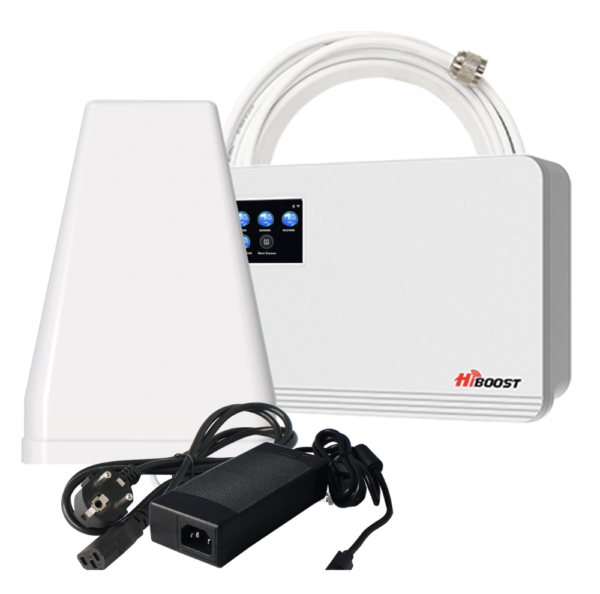
Stepping closer to a window or going outside might help temporarily, but the best solution is installing an indoor mobile phone signal booster.
A properly installed booster can:
- Eliminate drop calls
- Improve voice clarity
- Boost 4G/5G data speeds
- Strengthen signal across multiple rooms
This is the fastest and most effective method for restoring reliable indoor connectivity.
Mobile Device Hardware or Software Issues
Sometimes the issue isn’t the network or the environment—it’s the phone itself.
Possible Causes
- Outdated operating system
- Failing antenna inside the phone
- Damaged SIM card
- Poor network settings configuration
How to Fix Drop Calls From Device Issues
Try the following steps:
- Restart your device
- Update your OS and carrier settings
- Remove and clean the SIM card
- Toggle Airplane Mode off and on
- Reset network settings
If none of these work, your phone may need professional repair.
When You Need a Permanent, Powerful Solution
If drop calls are a daily frustration, no temporary fix will give you lasting results. The most reliable form of improving mobile signal is installing a signal booster tailored to your environment. This ensures stable voice calls, stronger data speeds, and consistent connectivity—no matter the network or location.
Whether you’re driving through rural areas, living in a low-coverage zone, or facing indoor signal blockage, boosters provide the strongest long-term answer for anyone searching for how to fix drop calls.
Final Thoughts
Dropped calls are inconvenient, frustrating, and disruptive—but they’re completely fixable. By understanding the root causes and using the right solutions, you can restore strong, seamless mobile connectivity across your home, office, or vehicle.